

A compliance assessment goes through one framework, such as a regulation or a standard, clause by clause. For each clause you record whether your product or organization meets it, explain how, and attach the evidence. Nuxy shows how far you have got; it does not decide whether you comply.
Create the Assessment
- Open Compliance → Assessments and choose New Assessment.
- Under Object, choose a product or your organization.
- Choose the Framework. Nuxy notes when a framework may apply to the product, based on its profile; whether it applies is your decision.
- Choose Create.
Some frameworks ask for assessment attributes at the top of the assessment, such as the product class or the conformity assessment procedure. Set them first, because they change which clauses and documents apply.
Record a Conclusion for Each Clause
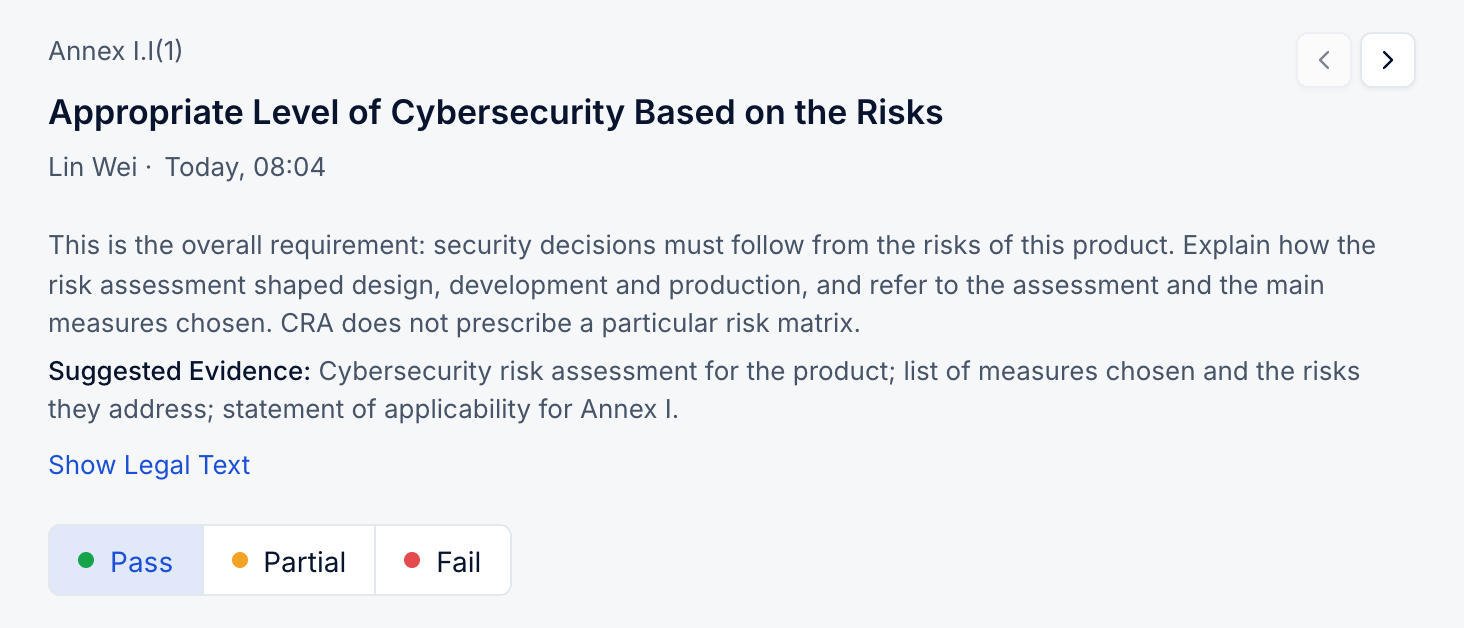
The Clauses tab lists the clauses in the framework's order. Select one to open it. Each clause shows:
- An explanation of what the clause asks for, and the suggested evidence. Show Legal Text shows the original wording.
- The conclusion options, such as met, partly met, not met or not applicable.
- A text field for your explanation. A partial or failed conclusion asks what is missing and how you will fix it; not applicable asks for the reason.
- Related Platform Data, such as the linked risk assessment, controls and the Statement of Applicability, so you can refer to work already done in Nuxy.
Use Filter to find clauses that still need work, for example those with a missing explanation.
Attach Evidence
Under Evidence on a clause, choose Upload to add a file, or Choose from files to reuse a file already in the organization's file library (Compliance → Files). One file can serve as evidence for many clauses and assessments. Evidence files cannot be changed once uploaded; upload a new file to replace one.
Track Readiness
The readiness bar at the top counts the clauses that are Met, Partly Met, Not Met, Not Applicable and To Be Assessed. Readiness shows progress through the assessment, not a compliance result.
Use Comments on a clause to discuss it with colleagues; type @ to mention someone.
Snapshots and Reviews
When you reach a milestone, such as a release, choose Freeze Compliance Snapshot. A snapshot keeps the conclusions and evidence as they were and cannot be changed. Packages for reviewers are exported from snapshots; see Share a Compliance Package.
Assessments also have a next review date. The Reviews tab records each review.